Inbound Lead-to-Meeting Engine: Turning a Web Form into a Booked Meeting
Why This Problem Exists
Someone fills in the contact form on a company website. What happens next decides whether that company becomes a customer.
In most companies, the honest answer is: not much, for a while.
The form arrives in a shared inbox. Somebody reads it eventually. Nobody checks whether this company is already a customer. Nobody knows if it is a big account worth calling today, or a small shop that will never buy.
By the time someone replies, the buyer has already talked to a competitor.
Sales teams call this speed-to-lead. How fast you reply is the single biggest factor in whether an enquiry turns into a customer. The window that matters is measured in minutes.
The cost is quiet:
- A valuable enquiry sits unread while a competitor answers the same buyer.
- An existing customer fills in the form, and a duplicate record is created next to their real one. Now two people own the relationship.
- Every enquiry gets the same effort, whether the company will buy or not.
- Nobody can say afterwards how many enquiries arrived, or which ones went cold.
Most teams handle this with a rota. Someone checks the inbox each morning and forwards things. That works until the person goes on holiday.
So I built a system that does the whole thing automatically.
Project Overview
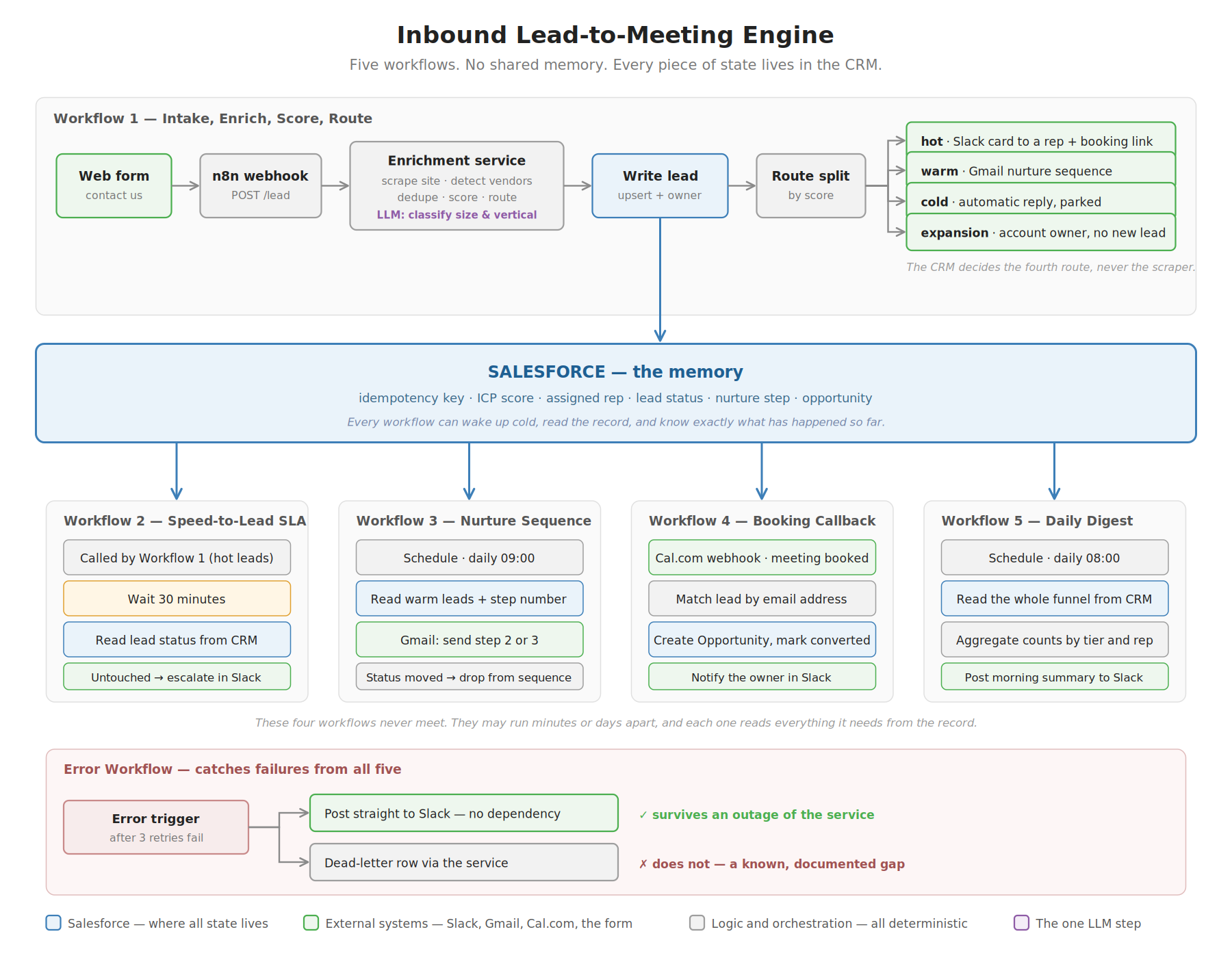
The Inbound Lead-to-Meeting Engine receives a form submission, researches the company from its public website, checks the CRM, gives the lead a score, and sends it down one of four paths.
Then it keeps watching. If nobody responds in time, it escalates. If the prospect books a meeting, it creates the deal record automatically.
Seven systems are involved: a web form, n8n, a Python service, Salesforce, Slack, Gmail and Cal.com. All free tier or open source.
The workflows remember nothing. Salesforce remembers everything. Every routing decision is made by simple rules, not by AI.
All the records are invented — 203 fake companies, four fictional salespeople, made-up volume figures. All the systems are real — real logins, real webhooks, real API calls, real scraping of real company websites.
The rule I followed: fake the data, never fake the systems.
The Four Paths
Four genuinely different things can arrive through one form.
| What arrived | What it needs |
|---|---|
| A large company using a competitor | A salesperson today, with a booking link |
| A mid-sized company that might fit later | A short email sequence, not a phone call |
| A company that will never buy | One polite reply, and no more cost |
| A company that is already a customer | The account owner, and no new record |
That last row is the one most systems get wrong.
In Salesforce, a Lead is a company you do not know yet. An Account is a company that already buys from you. If a customer fills in your form and the system creates a Lead, that company now exists twice. Two people own it. Reports count it twice.
So the fourth path creates nothing. It finds the existing Account and tells whoever owns that relationship.
And the CRM decides this, not the website scraper. If the scraper thinks it found something but Salesforce disagrees, that gets logged as strange. It never changes the routing. A scraper is a weaker source of truth than your own CRM.
The Hard Part: Five Workflows That Cannot Talk
This was the real engineering problem.
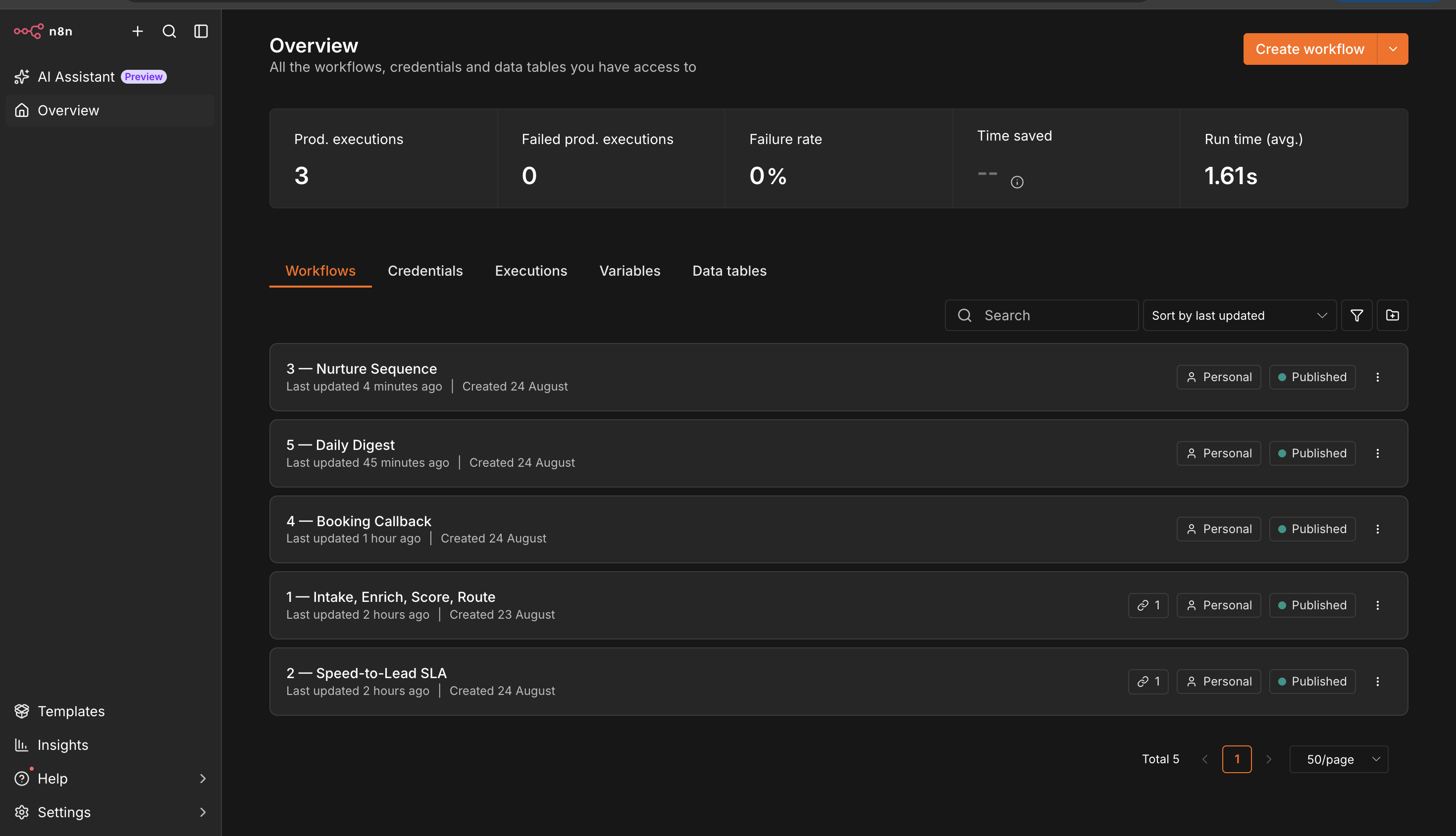
The system uses five separate workflows. They cannot pass information between them. That is not a design choice, it is just how the timing works:
- Workflow 1 handles the form. It finishes in four seconds and disappears.
- Workflow 2 wakes up 30 minutes later, asking “did anyone reply to that lead?”
- Workflow 4 might run three days later, when someone books a meeting.
By the time Workflow 2 runs, Workflow 1 is long gone. It left no note.
So how does anything work?
Nothing is remembered inside the workflow. Everything is written onto the Salesforce record. The score, the assigned salesperson, the status, the position in the email sequence.
Salesforce is the memory. The workflows are just hands.
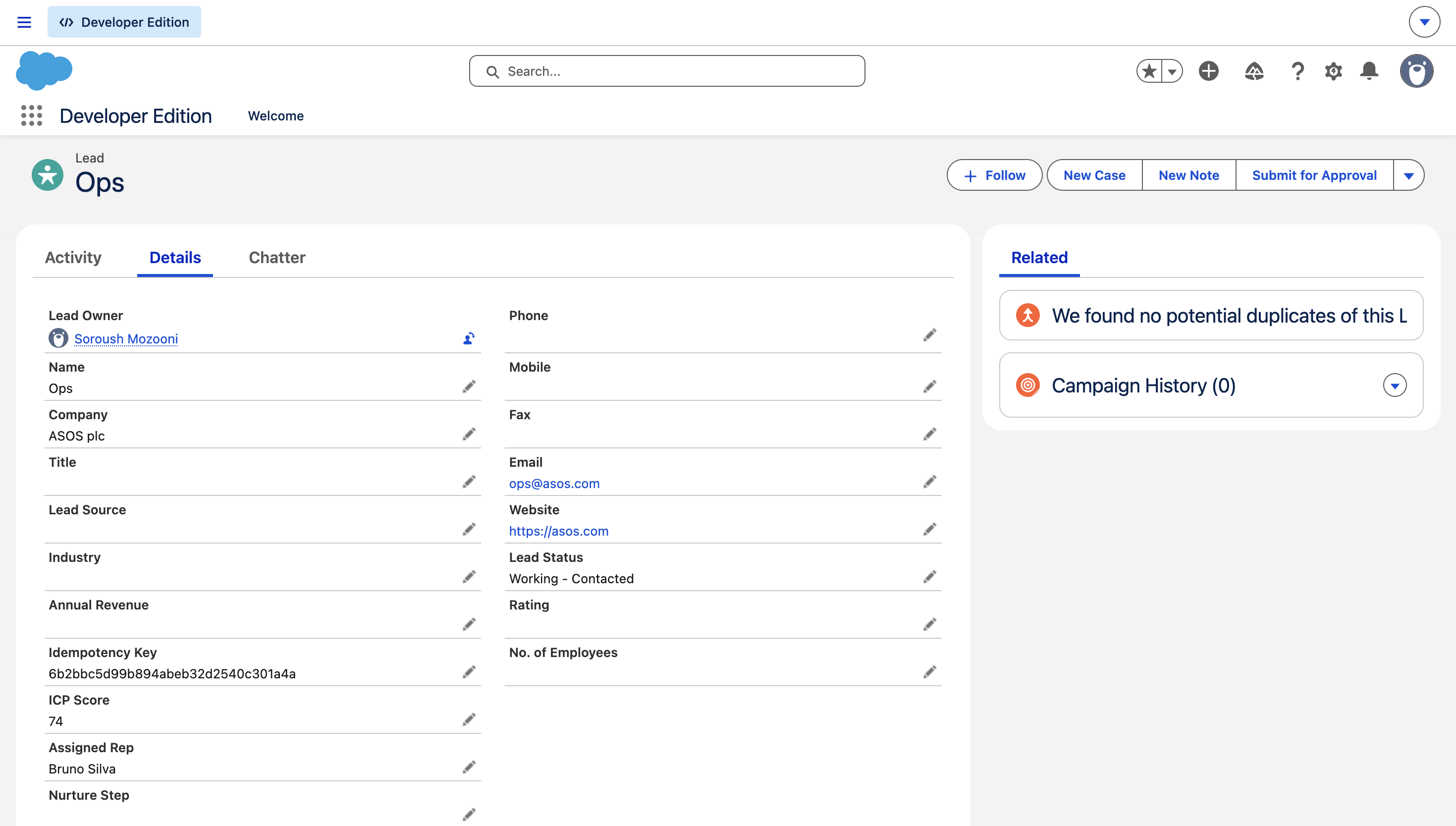
Four things follow from that:
The 30-minute check reads the status from Salesforce instead of remembering it.
The email sequence writes down which step it just sent, on the record. So a missed run or a repeated run cannot break the sequence.
The booking finds the lead by email address. Nothing is carried across from three days earlier.
Assigning salespeople is done by counting leads in Salesforce. The obvious way is a counter in the code — last one went to Anna, next goes to Bruno. But a counter in memory is lost every time Docker restarts, and the balance drifts forever after. So instead the system asks the CRM who currently has the fewest open leads.
A workflow that has to remember something across a restart is a workflow that will eventually be wrong. Put the memory somewhere that survives.
The Measurement That Changed Everything
Part of the score depends on knowing which payment provider a company already uses. If they use a competitor, that is a strong buying signal.
Before building scoring on top of that, I wanted to know how well the research actually works.
I tested it on 200 real European merchant websites, chosen across three size bands before running anything. I did not add or remove a single site based on whether it worked.
| Measure | Result |
|---|---|
| Sites that responded at all | 150 of 200 |
| Sites where I found any software | 102 of 200 |
| Sites where I found the payment provider | 20 of 200 |
One in ten.
Then I looked at it by company size, and this is what I did not expect:
| Company size | Found something |
|---|---|
| Small | 76% |
| Medium | 55% |
| Large | 33% |
Small shops reveal more than twice as much as large ones.
The reason is simple. Big companies serve outside scripts through their own servers and block automated visitors. Small shops load vendor scripts directly, where anyone can read them.
But think about what that means:
The companies a salesperson most wants to know about are the companies you can learn least about.
That is backwards. And it is the kind of thing a team discovers a year after building a process on top of it. No data vendor publishes this about their own coverage. You have to check yourself.
Payment providers are the hardest of all, for a specific reason: the payment code only loads once someone puts an item in their basket. A scraper with an empty basket never gets that far. Better engineering does not fix that.
The line I chose not to cross
About a third of large sites simply refused my requests.
Better headers recovered some. For the rest I tested a headless browser with the automation signals hidden. It is a well-known technique, and it partly worked.
I removed it and did not use it.
It is not illegal, but it breaks the terms of service of the sites doing the blocking. For a project aimed at commerce and payments companies, a higher number obtained that way seemed like the wrong trade.
The browser is still used, so that scripts loading later are visible. But it does not pretend to be something it is not. Sites that refuse are recorded as refusing, not as failures.
That decision costs the project several percentage points. I mention it because a number only means something if you know how it was produced.
How the Score Works
Four inputs, out of 100, all defined in a config file:
| Input | Points | Comes from |
|---|---|---|
| Uses a competitor’s payment tool | 30 | Website research |
| Monthly payment volume | 40 | The form |
| Region | 15 | The form |
| Type of business | 15 | AI reading the website text |
70 or higher is hot. 40 to 69 is warm. Below 40 is cold.
Plus one separate rule: below €1M a month, a lead can never be hot, no matter what it scores.
That rule exists because of a bug, described further down. But the principle is worth stating on its own:
The score asks is this the right kind of company. The volume asks is this deal worth an hour of someone’s time. Two questions need two mechanisms.
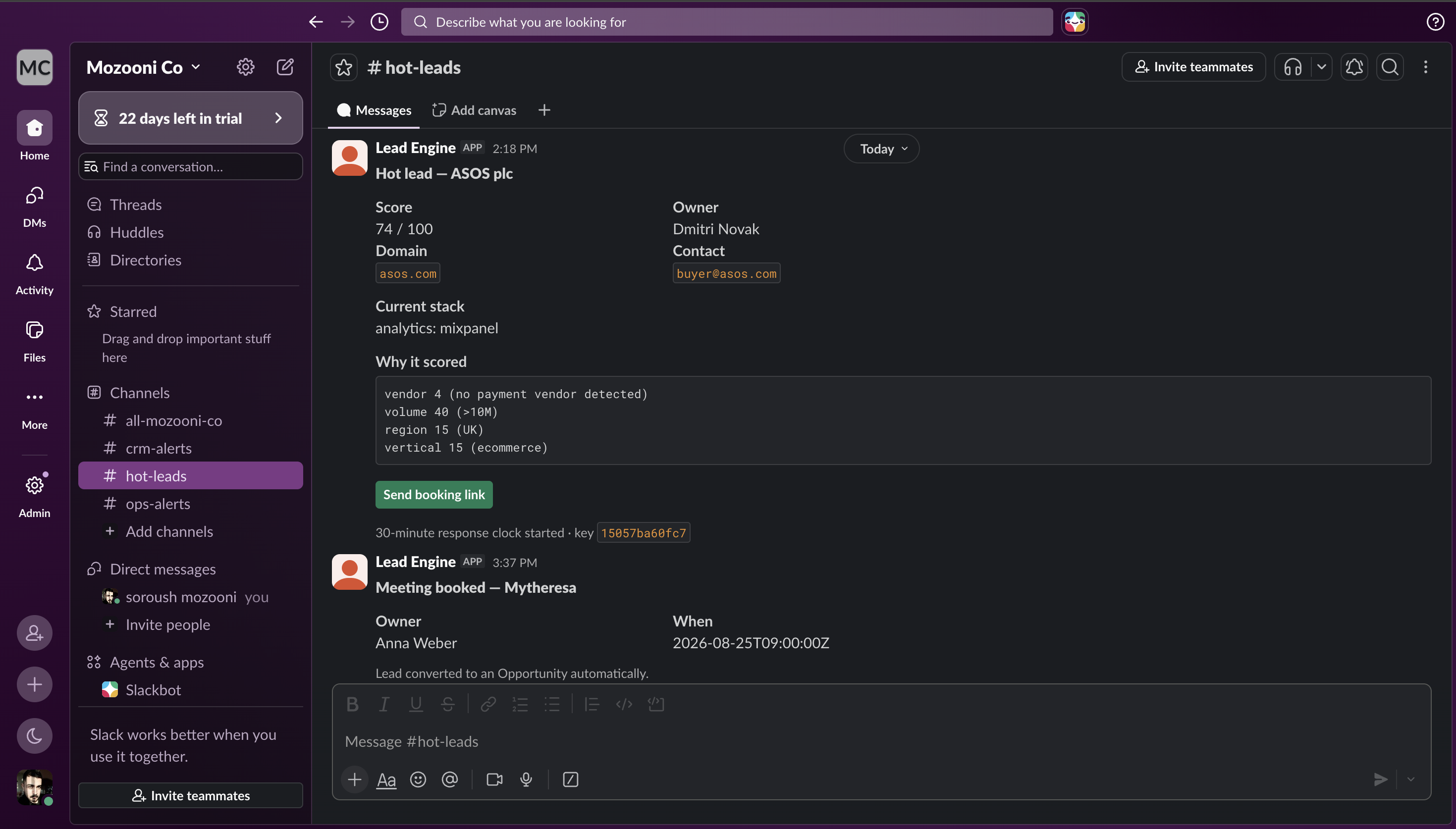
Everything here is arithmetic. No model, no AI, no learned weights. The same inputs always give the same answer — and the Slack message shows the sum line by line.
Swap the config file, retarget the system
The weights, thresholds and competitor list all live in a YAML file. Two ship with the project.
Running the same leads through both, with no code change:
| Lead | Payments profile | SaaS profile |
|---|---|---|
| zalando.de | hot (100) | warm (57) |
| personio.com | warm (56) | hot (97) |
| tarsnap.com | cold (23) | warm (81) |
The ranking flips. A large European retailer is the best possible lead for a payments company and an average one for a software seller. The config file is the only thing that knows the difference.
Stopping Duplicates
Someone double-clicks Submit. A webhook retries after a timeout. A form is filled in twice a week apart. None of these should create a second lead.
Every submission gets a fingerprint made from the domain, the email and the date. That fingerprint is stored in Salesforce in a field marked Unique.
If the fingerprint already exists, Salesforce updates the existing record. If not, it creates one. There is no code that checks first and writes second, so there is no gap between the check and the write.
Where the guarantee lives matters. Workflow logic can be rewired by anyone dragging a node. A unique rule in the database cannot.
Measured, by sending the same four leads twice:
first time  -> Received 4, New 4, Duplicate 0
second time -> Received 4, New 0, Duplicate 4
owner assignment unchanged: True
That last line matters as much as the counts. It exists because of a bug, below.
Two Numbers, Not One
Before writing any scoring code, I wrote down what tier 30 specific companies should land in, and why. That file is the answer key.
Then I tested twice, and the two tests do not agree.
Test one — the rules on their own: 27 out of 27.
I told the scorer what I expected the research to find. Every tier matched. So the rules do exactly what I intended.
Test two — the whole system on live websites: 24 out of 30.
All six failures are the same case. Companies I expected to be hot came out warm, scoring 60 to 64 against a threshold of 70. Every one had an empty research result.
The arithmetic is exact. I assumed 30 points from finding a competitor. The research found nothing, which scores 4. Those 26 missing points take a 90 down to 64.
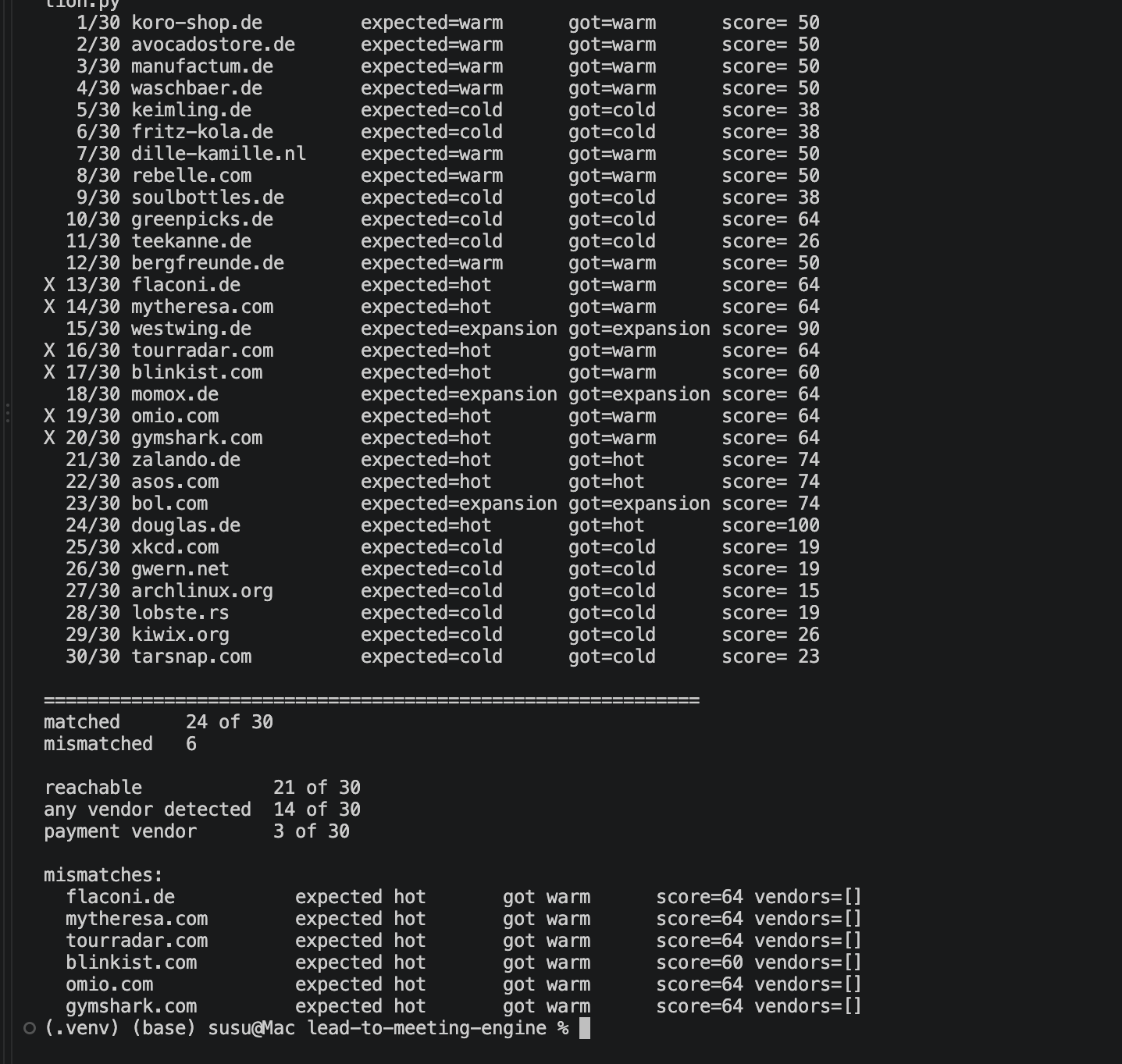
That gap is the most useful result in the project.
The first number tells you whether your rules match your intention.
The second tells you whether the system gives the right answer in the real world. Only the second one matters operationally, and they are not the same question.
Quoting only the first would be true and misleading. Any project can report the number from the test that passed.
And here is what makes it genuinely risky rather than just disappointing: nobody would notice. No error. No warning. No empty field. A 64 looks completely normal. A sales team would quietly under-work real opportunities for months with no signal that anything was wrong.
That is exactly why the Slack card shows “no payment vendor detected” instead of only the total. A salesperson looking at 64 can tell the difference between a mediocre lead and a good lead the system could not see properly.
Two limits worth stating: the volume, region and business type for each test company are my assignments, not measured facts. Only the research is measured. And 30 companies is a small sample, which is why I report counts rather than percentages.
Things That Went Wrong
The bug found before the code existed
Writing the answer key first was meant to be planning. It found a bug instead.
With the original weights, a competitor, plus Europe, plus online shop already came to 60 points before money was considered at all. The threshold is 70. So a tiny webshop scored 76 and would have woken a salesperson at 2am.
The obvious fix is to change the weights. I did not, because that would have broken the ranking between genuinely different companies.
Instead I added the volume rule as a separate thing. The score still says the company is a good fit, because it is. The rule says the deal is too small to interrupt someone for.
This is the strongest argument for writing expected results before writing code. If I had built it first, this bug would have stayed invisible until a real salesperson was woken up by it.
Two bugs that turned out to be one lesson
Leads silently changed owner. The assignment logic ran on every save, so a resubmitted form moved the lead to a different salesperson. In a real team, someone starts working a lead and it quietly moves to a colleague.
The timer restarted on leads already answered. Every save reset the status to “not contacted”, wiping the salesperson’s progress and setting off the escalation alarm again.
Both were fixed the same way: only set those fields when the record is first created.
These are the same mistake twice. If a human owns a field, an automatic system must not overwrite it. I only saw the pattern after fixing the second one. One bug is an incident. Two is a rule.
The alarm that could not ring
This was the most instructive failure.
I built an error handler so I would be told when a workflow fails. It had one action: send a message through my own service.
To test it, I switched the service off and submitted a lead.
The workflow retried three times, failed, and correctly handed over to the error handler. The handler fired. Its only action was to call the service that was down.
Complete silence. No alert, no record, nothing.
An error handler that runs through the thing it monitors cannot report that thing’s failure. Which is the failure you most need to hear about.
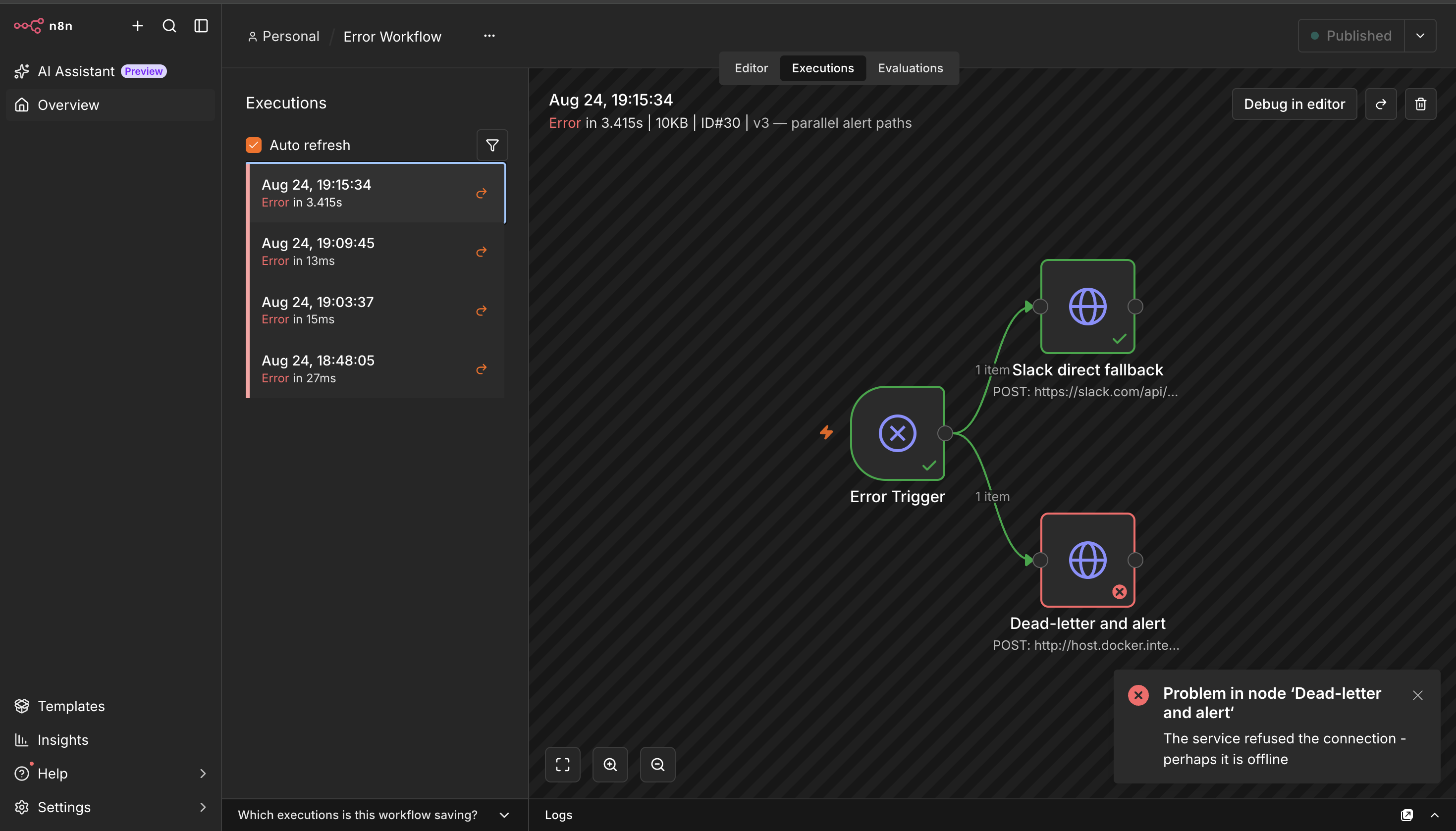
The fix was a second path, connected directly to the trigger rather than after the first node, posting straight to Slack with no dependency on my service.
With the service still down, the alert arrived.
It is still not fully fixed, and I would rather say so. The alert is now independent. The written record is not — it still goes through the same service. So during an outage I am told something failed, but not given a record I can replay afterwards.
The first thing I test on any error handler now is whether it survives the failure of the thing it watches.
Salesforce does not offer lead conversion in the API I use
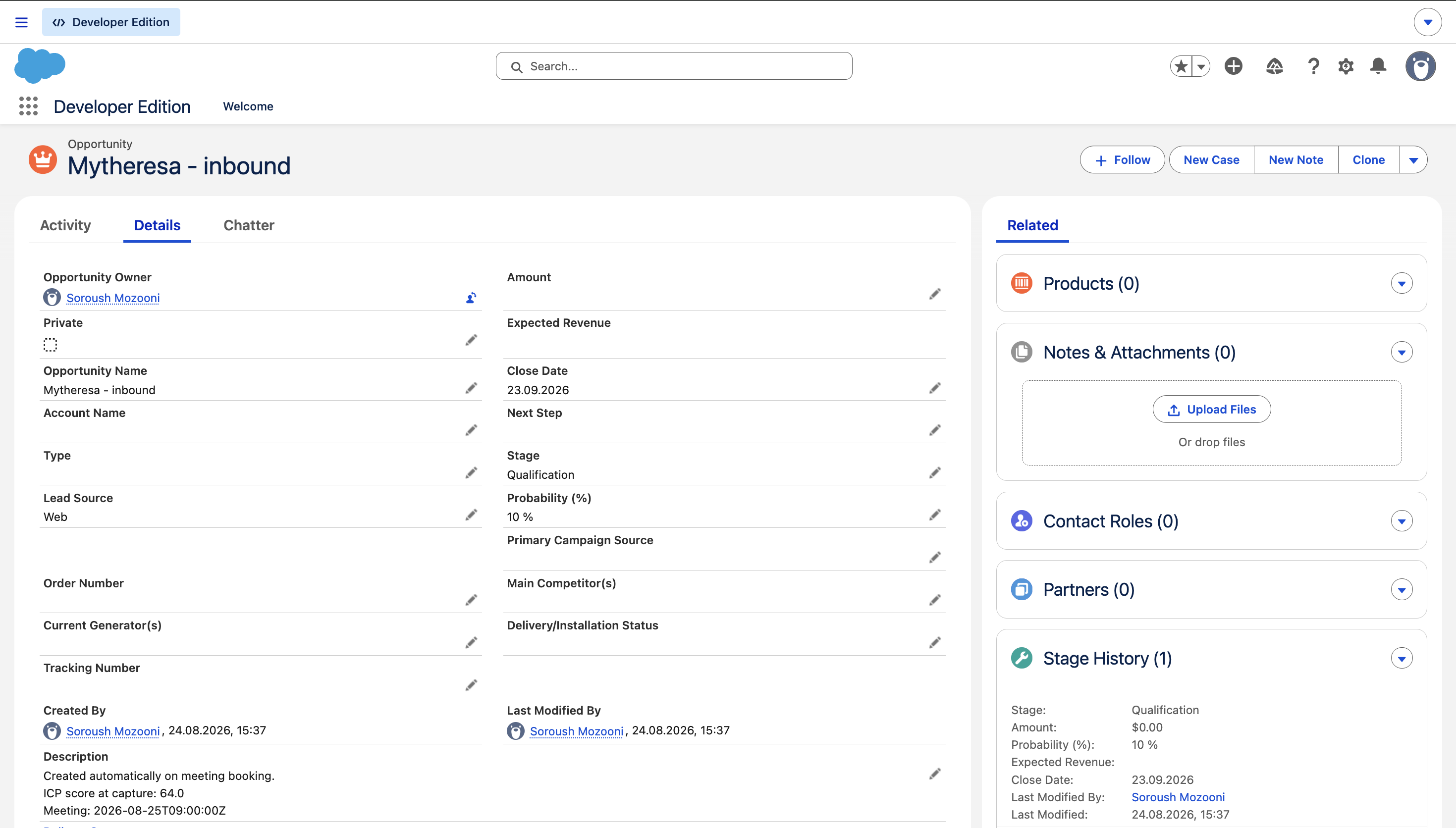
When someone books a meeting, the lead should become a deal record. Salesforce offers this in two older interfaces, but not in the REST API.
I could have added a second protocol for one call. Instead the system does it explicitly: create the deal, then mark the lead converted.
The honest limitation: the built-in method also creates a company record. This does not. For this project the deal is what matters, but a production system would need the full conversion.
Results
| Measure | Result |
|---|---|
| Scoring rules against the answer key | 27 / 27 |
| Full system on live websites | 24 / 30 |
| Sites reachable | 21 / 30 |
| Payment provider found | 3 / 30 |
| Time to process one lead | 3.7 seconds |
| Duplicates created on resubmission | 0 |
| Unit tests | 14 |
From the wider 200-site benchmark:
| Measure | Result |
|---|---|
| Any software found | 102 / 200 |
| Payment provider found | 20 / 200 |
| Small companies | 76% |
| Large companies | 33% |
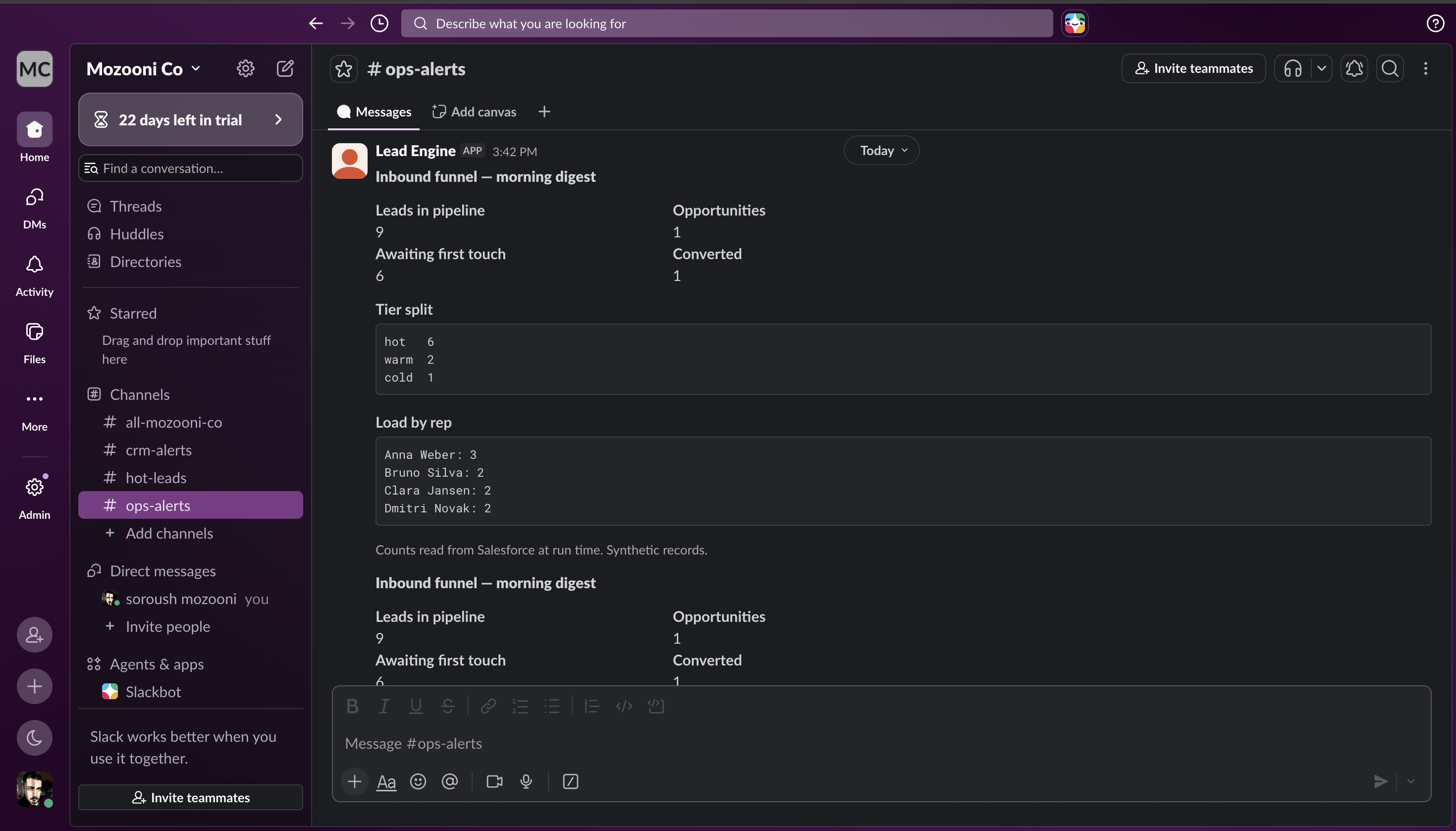
Look at the load per salesperson in that digest: 3, 2, 2, 2. Even across every lead created since the assignment bug was fixed. That is the ongoing proof the fix holds.
What I Would Do Differently
- Write the failure record independently of the service. The one weakness I know about and have not closed.
- Reconsider what feeds the score. The evaluation says clearly that payment detection is too thin to carry 30 points. Either move weight onto signals that are actually visible, or accept that this needs a paid data provider rather than a scraper. At real scale, the second is probably the honest answer.
- Have someone else write the answer key. My expected results and my scoring rules share an author. That is a real limit on what the evaluation proves.
Build This or Buy It?
Worth answering directly, because most of this can be bought.
Company research: buy it. Clearbit and Apollo have coverage a scraper cannot approach. My 10% is not competing with anyone.
Email sequences: buy it. Marketo and HubSpot handle scheduling, deliverability, unsubscribes and compliance. I wrote forty lines because the project needed one, not because it should be built.
Lead routing: probably buy it. LeanData and Chili Piper exist and are good.
What is left is the part nobody sells:
How you define a duplicate submission, and where that guarantee lives. The state model that lets independent workflows cooperate across days. What to do when the research finds nothing — the difference between a system that degrades gracefully and one that silently misroutes. And the scoring rules, which encode what this business thinks a good lead is.
And the measuring. No data vendor will tell you their coverage is worst on your biggest accounts. That was four hours of work, and it changed how I read every other number in the project.
Buy the commodity. Build the thin layer that knows how your own funnel breaks. And measure the commodity before you trust it.
Technologies & Techniques
- n8n: Five workflows plus a global error handler, self-hosted in Docker.
- Python & FastAPI: The service that n8n calls. All decision logic lives here, not in the workflow canvas, so it can be tested and version controlled.
- Salesforce REST API: OAuth 2.0, SOQL queries, batch operations, and upsert on a unique External ID field.
- httpx, BeautifulSoup & Playwright: Website research, including a browser fallback for scripts that load late.
- RapidFuzz: Fuzzy company-name matching with a tested threshold.
- Slack API: Lead cards with score breakdowns, escalations, digests, and an independent failure alert path.
- Gmail API: Email sequences, with all recipients rewritten to contained test addresses so nothing reaches a real company.
- Cal.com: Booking webhooks that trigger the conversion.
- SQLite: Observability only — run metrics and failure records. Never read to make a decision.
- Config-driven scoring: YAML profiles that retarget the system without code changes.
- pytest: 14 tests, no external calls.
The fuzzy-matching threshold is tested from both directions on purpose. Tests that only confirm true matches would pass even with the threshold set to zero. The tests that matter are the ones proving West Wing Catering does not match Westwing Group.
Conclusion
This system connects form intake, website research, CRM duplicate checking, scoring, four-way routing, response timers, booking conversion and daily reporting into one process across seven systems and five independent workflows.
The hard part was not integrating any single API. Each one is straightforward.
The hard part was building something coherent out of executions that never meet — where the workflow handling a form has finished and vanished before the workflow checking on that lead has even started.
The answer was to stop trying. The workflows hold nothing. The CRM holds everything.
But the result I will actually carry forward is the one I nearly did not measure.
Running that 200-site benchmark felt like a detour. It turned out to be the only reason I can say what my own system will and will not catch — and the only reason I know its weakest coverage is on exactly the accounts worth the most.
Without it, this page would report 27 out of 27 and a confident story about how well everything works.
That story would have been true, and useless.
The full code, including the vendor config, both scoring profiles, all five workflow exports, and the benchmark and evaluation scripts, is on GitHub: github.com/Vizbase/Lead-to-Meeting-Engine. All records are synthetic. All websites scraped are real.